Learn a Language by Talking — Speak Out Loud With an AI Teacher
Open the app, tap the mic, and have a real voice conversation in your target language. No human listening, no scheduling — just five to ten minutes of actually speaking, with a scored report when you finish.
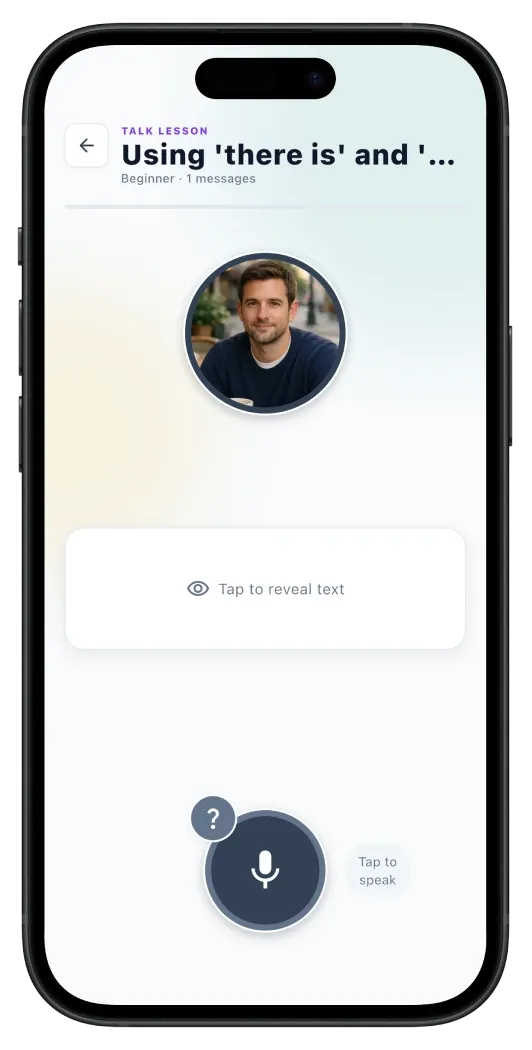
Learn a language by talking — out loud, into your phone, without anyone watching.
You can learn a language by talking — really talking, out loud, into your phone — without booking a tutor or finding a partner. That is what Talk Mode does. Pick a topic, tap the microphone, and have a real voice conversation with an AI teacher in your target language. The teacher listens, replies in audio, and adapts to your difficulty level. Every reply is tappable for a written translation and grammar breakdown. When you finish, Erla writes a scored report that names every mistake you made and what to practice next.
Most learners can already read and listen to their target language long before they can open their mouth. The block is not knowledge — it is the moment of speaking itself. Nothing rehearses that moment except actually doing it, and the cheapest way to actually do it is in a room with no other humans in it. Talk Mode is that room.
Erla is the AI language tutor app built for the full input-to-output loop. Talk Mode is the output side, alongside Listening, Reading, Watch, and Chat. It runs in all twenty-two Erla languages, on iOS and Android, in five to ten minutes a session. PRO, with a seven-day free trial.
How a Talk Mode session works
Five steps. About five minutes a conversation. As many conversations a day as you like.
- 1
Pick a topic — twelve presets or type your own
Choose from twelve preset categories shown as visual cards — everyday situations, travel, work, hobbies, food, culture, relationships and more — or type your own topic. Erla quickly checks the topic is safe and language-learning appropriate, then builds the conversation around it.
- 2
Tap the microphone and start speaking
When you are ready, tap the mic and say what you want to say in your target language. Erla uses speech recognition to capture your words, transcribe them into the chat thread, and send them to the AI teacher. Mumble, restart, try again — the mic does not judge.
- 3
The teacher replies in voice, at your level
The teacher speaks back through your phone in clear, level-matched language — Beginner, Intermediate, or Advanced. Replies are short enough to hold in your head and natural enough that you pick up rhythm and intonation alongside meaning.
- 4
Tap any teacher reply for translation and grammar
Every teacher message is also written into the chat thread. Tap any one for a translation in your native language plus a grammar breakdown of that exact sentence — verb tense, word order, why this article and not the other one.
- 5
Finish to see your scored performance report
Tap Finish whenever you are done and Erla generates a full report: an overall score from zero to one hundred, a summary of the conversation, your strengths, two or three concrete weak spots, vocabulary you used in context, every grammar mistake with the correction, and personalised next steps for tomorrow.
Why talking out loud beats only listening and reading
Three reasons an AI voice conversation builds speaking faster than reading or listening alone.
Speaking is a different skill from understanding
Comprehension and production live in different parts of the brain. You can grow your input skills — listening and reading — for months without ever building the output muscle that lets you reply. Talk Mode rehearses the output side directly. You hear, you choose words, you actually say them. That loop is what builds speaking.
Your mouth needs reps your eyes can't give it
Forming the sounds of a new language is a physical skill — lips, tongue, breath. The only way to train it is to make those sounds, many times, with feedback. Reading a word in your head ten times is not the same as saying it once out loud. Talk Mode gives you the reps.
A private AI room removes the anxiety that freezes most learners
Most adults stop speaking practice because of the room, not the language. A native speaker is watching. A teacher might interrupt. Group classes feel exposed. Talk Mode removes the room — it is just you, your phone, and a teacher that will never sigh, never look impatient, and never bring it up later. Keep talking until it stops feeling strange.
Built for people who want to speak a language without a partner
If you have ever tried to speak a language without a partner — no native speakers nearby, no exchange buddy who actually shows up — Talk Mode is the room you have been looking for.
No native speakers in your city
You are learning a language nobody around you speaks. Language-exchange apps mean strangers, scheduling, and waiting for someone in another timezone to be free. Tap the mic instead and start a conversation in your kitchen, in your headphones, at your own pace.
You can read and listen but can't open your mouth
You understand sentences, you know the grammar, you have watched the videos — but the moment you have to reply you go blank. The block is the act of speaking, not the language. Talk Mode rehearses exactly that block, in five-minute reps.
You're too anxious to book a tutor
Live lessons are the fastest route to fluency and also the scariest. Many learners book once, freeze, and never go back. Talk Mode lets you sound bad in private first. By the time you do book a human, you have already said the worst version out loud.
Your language-exchange partners keep drifting away
You found a partner, you had three calls, the schedule slipped, they ghosted. Talk Mode does not ghost. You can practice speaking a language alone, today, this afternoon, between meetings — without depending on anyone else's calendar.
Twelve topics — or any subject you want to talk about
Conversation only works if you actually care about the subject. Talk Mode lets you choose.
Twelve preset categories
Each category appears as a card on the topic screen. Tap one and the teacher opens with a question shaped around that theme — at your difficulty level.
- Everyday situations
- Travel and directions
- Work and careers
- Hobbies and interests
- Food and cooking
- Family and relationships
- Health and wellbeing
- Culture and traditions
- Shopping and money
- Technology
- News and current events
- Free-form chat
Or speak about anything you want
Ordering coffee in Lisbon next week? Pitching your side project to a friend at the weekend? Rehearsing the meeting you have on Thursday? Type the topic in plain English — or in the target language — and Talk Mode opens a voice conversation built around it. The teacher stays on theme, you just speak.
Every conversation ends with a scored report
The part that makes Talk Mode a tutor and not just a chatbot with a microphone.
Tap Finish at any point and Erla writes a full breakdown of the conversation you just had. It is the same kind of feedback a private language teacher would give you after an hour together — except it arrives in about ten seconds, every time.
Overall score
A single number from zero to one hundred summarising how well you held the conversation, weighted across vocabulary, grammar accuracy, and the depth of what you actually said.
Conversation summary
Two or three sentences in your native language describing what you talked about, so you can scan past Talk sessions and remember where you left off.
What you did well
Specific strengths pulled from the actual sentences you spoke — "used the past tense correctly," "asked follow-up questions," "used new vocabulary in context."
Where to improve
Two or three concrete weak spots framed as next steps, not criticism — "watch verb endings on plural subjects," "try a slightly longer reply next time."
Vocabulary used in context
Every new or notable word from the conversation, with the sentence it appeared in. Cached in your account so you can review it later.
Grammar mistakes with corrections
Every grammar slip, the sentence you actually said, the corrected version, and a one-line explanation of why the correction matters.
What's inside every Talk Mode session
Small details that make this a real AI language teacher in your pocket — not a generic chatbot pretending.
Voice input via speech recognition
Speak naturally and Erla transcribes what you said into the chat thread, then sends it to the AI teacher. Mumble, pause, restart — the mic forgives.
Teacher adapts to your level
Beginner, Intermediate, or Advanced — set once in onboarding, adjustable any time. The teacher's vocabulary, sentence length, and conversation depth shift to match yours.
Tap any reply for translation
Every teacher message is written into the chat as well as spoken. Tap once for a translation in your native language, tap again for a sentence-level grammar breakdown.
Twelve topics, plus custom
The same twelve topic categories as Chat Mode, or type any topic up to two hundred characters. Erla checks it is safe and on-task before opening the conversation.
Lesson history to resume any session
Past Talk sessions sit in a History tab, grouped by Today, Yesterday, Last seven days, Last thirty days, and Older. Resume an unfinished session with one tap.
All twenty-two Erla languages
English, Spanish, French, German, Italian, Portuguese, Dutch, Swedish, Norwegian, Danish, Finnish, Polish, Czech, Hungarian, Greek, Turkish, Romanian, Croatian, Slovak, Serbian, Ukrainian, Russian.
Pairs with Chat for input plus output
Same topics, same scored report — one in text, one in voice. Many learners type in Chat to think a topic through, then open Talk to put the same vocabulary in their mouth.
Included in PRO — seven-day free trial
Talk Mode is a PRO feature, alongside Watch and Chat. New users get a full seven-day free trial of PRO so you can test it before paying.
What if I'm not ready to speak yet?
The honest answer is that you are ready, in the sense that matters. You do not need a vocabulary list, a grammar foundation, or three more months of daily lessons before you start talking. The opposite is closer to true — the longer you put speaking off, the bigger a deal it becomes in your head. The reason most adult learners stall at intermediate is that they never crossed the speaking threshold, not that they did not memorise enough verbs.
If you want to ease in, pair Talk Mode with Listening and Reading for a few days first — five minutes of each, just to get the sound of the language in your ear. Then open Talk and pick the safest topic on the list (everyday situations is a good first pick). You will fumble. The teacher will keep going. After two or three short sessions, the room you were afraid of stops feeling strange.
Talk Mode — FAQ
Short answers to what people ask before they download.
Yes — spoken conversation is the only practice that builds the speaking muscle, and a voice AI is the cheapest and least intimidating way to start. When you learn a language by talking, you are not memorising; you are choosing words in real time and saying them out loud, which is exactly the skill that makes you fluent. Erla's Talk Mode runs that loop with a scored report after every conversation, so the practice compounds quickly.
Pairs well with the other Erla modes
Talk builds active speaking. The other modes feed it the input and the confidence it needs.
Listening Mode
Native-pace audio clips with the text blurred — trains the ear that Talk Mode then borrows from. Free.
Reading Mode
Short stories with sentence-level translation and grammar — builds the vocabulary you bring into a Talk session. Free.
Watch Mode
Short videos play without subtitles first, then reveal the text — reinforces what your ear already knows. Limited free, PRO for unlimited.
Chat Mode
Same twelve topics, same scored report — but in writing instead of voice. Most learners use Chat to think through a topic, then open Talk to say it. PRO.
Start your first voice conversation today
Pick the language you are learning and start talking in five to ten minutes. PRO with a seven-day free trial, available on iOS and Android.