Learn a Language by Chatting — Text an AI Tutor Who Adapts to You
Pick a topic — or type your own — and chat in writing with an AI language tutor who guides the conversation, fixes your grammar, and ends with a scored report. Text only. No microphone. No judgement.
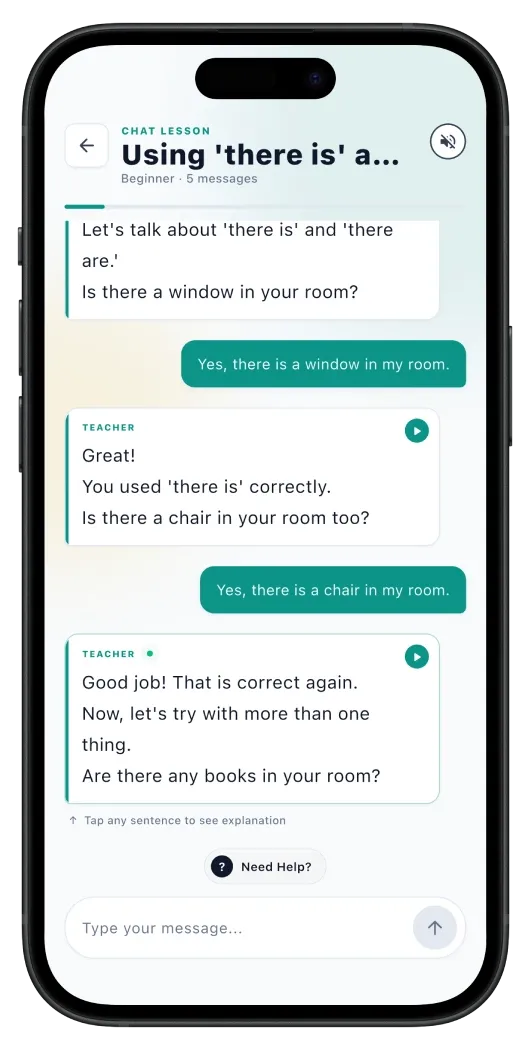
Learn a language by chatting — at your own pace, in your own words.
You can learn a language by chatting in writing, with an AI tutor that meets you where you are. That is the idea behind Chat Mode in Erla. Pick a topic, send a message, and the tutor responds in clear, level-matched sentences. Tap any reply to see the translation and a grammar breakdown. When you are stuck for a word, tap Hint. When you are done, a detailed report scores what you wrote and tells you exactly what to fix next.
Most AI language apps are racing toward voice. Chat Mode is deliberately the other way. Text gives you time to think. You can re-read what the tutor said, draft a reply, change your mind, and send it when you are ready — without a microphone listening or anyone waiting on the other end. The mistakes you make end up in writing, which is also where they are easiest to learn from.
Erla is the AI language tutor app built for that loop. Chat Mode runs in all twenty-two Erla languages, on iOS and Android, in five to ten minutes a day. It pairs naturally with Listening, Reading, Watch, and Talk — but it is the only mode designed to feel like a real language tutor at the other end of a chat thread.
How a Chat Mode session works
Five steps. About five minutes a chat. As many chats a day as you like.
- 1
Pick a topic — twelve presets or type your own
Choose from twelve preset categories shown as visual cards — everyday situations, travel, work, hobbies, food, culture, relationships and more — or type your own topic in up to two hundred characters. Erla quickly checks the topic is safe and on-target, then builds the lesson around it.
- 2
Start chatting with an AI tutor at your level
The tutor opens the conversation with a sentence tuned to your difficulty — Beginner, Intermediate, or Advanced. Reply in the target language. The tutor responds naturally, asks follow-up questions, and gently keeps the conversation in your target language so you do not slip back into English.
- 3
Tap any reply for grammar and translation
Each tutor message is tappable. Tap once for a full translation in your native language. Tap again to expand a sentence-level grammar breakdown — verb tense, word order, why this article and not the other one. Specific to the sentence you just read, not a generic chapter.
- 4
Stuck? Use the hint button instead of giving up
When a word will not come, tap Hint. Erla suggests two or three useful phrases you could send next, in the target language, with translations beneath. Pick one, edit it, or use it as a springboard for your own reply. The hint is a scaffold, not an autocomplete.
- 5
Finish to see your scored performance report
Tap Finish whenever you are done and Erla generates a full report: an overall score from zero to one hundred, a summary of the chat, your strengths, weak spots, vocabulary you used in context, every grammar mistake with the correction, and personalised next steps for tomorrow.
Why text chat beats voice for most learners
Three reasons typing your way into a language works — even better than speaking, especially at first.
You get to think before you reply
Spoken conversation forces you to produce a sentence in one or two seconds. Most learners freeze. Text gives you space to plan, re-read the tutor's question, look up a word, and send a thoughtful reply. The cognitive load drops; the quality of practice climbs.
Mistakes you can read are mistakes you can learn
When you misspeak a sentence, it vanishes. When you mistype a sentence, it sits there in the thread — and the end-of-chat report points right at it with the correction. Seeing the mistake in writing turns a momentary slip into a memory you actually keep.
No microphone, no audience, no excuses
Open the app on the commute, in a quiet office, in a waiting room, at the kitchen table while dinner cooks. Chat Mode never asks for your voice, your face, or your location. The only barrier between you and ten minutes of language practice is opening Erla.
Twelve ready topics — or anything you type
Conversation works better when you actually care about the subject. Chat Mode lets you choose.
Twelve preset categories
Each category appears as a visual card on the topic screen. Tap one and the tutor opens with a question shaped around that theme — at your difficulty level.
- Everyday situations
- Travel and directions
- Work and careers
- Hobbies and interests
- Food and cooking
- Family and relationships
- Health and wellbeing
- Culture and traditions
- Shopping and money
- Technology
- News and current events
- Free-form chat
Or type any topic you want to practise
Ordering coffee in Lisbon next week? Discussing your kid's homework with their teacher? Pitching a side project to a friend? Type the topic in plain English — or in the target language — and Erla quickly checks it is safe and language-learning appropriate, then opens a chat built around it. No other AI chat app lets you steer practice this precisely.
Every chat ends with a scored report
The part that makes Chat Mode a tutor, not a chat partner.
Tap Finish at any point and Erla writes a full breakdown of the conversation you just had. It is the same kind of feedback a private language teacher would give you after an hour together — except it arrives in about ten seconds, every time.
Overall score
A single number from zero to one hundred summarising how well you held the conversation, weighted across vocabulary, grammar accuracy, and message length.
Conversation summary
Two or three sentences in your native language describing what you actually talked about, so you can scan past chats and remember where you left off.
What you did well
Specific strengths — "used the past tense correctly," "introduced new vocabulary," "asked follow-up questions" — pulled from the actual messages you sent.
Where to improve
Two or three concrete weak spots framed as next steps, not criticism — "watch agreement on plural nouns," "try one longer sentence per reply."
Vocabulary used in context
Every new or notable word from the chat, with the sentence it appeared in. Cached in your account so you can review later.
Grammar mistakes with corrections
Every grammar slip, the exact sentence you wrote, the corrected version, and a one-line explanation of why the correction matters.
What is inside every Chat Mode session
Small details that add up to a real AI language tutor in your pocket.
AI tutor that adapts to your level
Beginner, Intermediate, or Advanced — set once in onboarding, adjustable any time. The tutor's vocabulary, sentence length, and conversation depth shift to match.
Hint system when words fail
Stuck mid-thought? Tap Hint for two or three suggested phrases in the target language with translations. Use them, edit them, or ignore them.
Tap any sentence for translation
Every tutor message is tappable. Translation appears in your native language, cached locally after the first tap.
Sentence-level grammar breakdowns
Each tappable sentence comes with a grammar explanation tied to that exact sentence — not a generic textbook chapter.
Custom topics with a safety check
Type any topic up to two hundred characters. Erla validates it is safe and on-task before generating the lesson, so the chat stays useful.
Lesson history to resume any chat
Your past chats sit in a history tab, grouped by Today, Yesterday, Last seven days, Last thirty days, and Older. Resume any unfinished one with a tap.
All twenty-two Erla languages
English, Spanish, French, German, Italian, Portuguese, Dutch, Swedish, Norwegian, Danish, Finnish, Polish, Czech, Hungarian, Greek, Turkish, Romanian, Croatian, Slovak, Serbian, Ukrainian, Russian.
Included in PRO — seven-day free trial
Chat Mode is a PRO feature, alongside Watch and Talk. New users get a full seven-day free trial of PRO so you can test it before paying.
Why this beats just chatting with ChatGPT
It is fair to ask — if I can already chat with ChatGPT, why open a dedicated app? The honest answer is that ChatGPT is a brilliant general assistant and an unreliable language tutor. It does not know your level, so it either patronises you with kindergarten phrases or buries you in idioms you cannot read. It does not score what you wrote, does not track which words you have actually seen before, and does not surface your grammar mistakes unless you remember to ask.
Chat Mode is a focused tutor instead of a sandbox. The tutor's difficulty is locked to yours. Every sentence is tappable for grammar and translation in your native language. The end-of-chat report points at every mistake you made and tells you what to fix next. The topics are filtered for language-learning use, not creative-writing brainstorms. You spend the ten minutes practising, not configuring.
Chat Mode — FAQ
Short answers to what people ask before they download.
Yes — written conversation is one of the fastest ways to build active language skill, especially early on. When you chat with AI to learn a language, typing forces you to choose your words and assemble grammar from scratch, the same way speaking does, but with time to think and a record you can learn from afterwards. Erla's Chat Mode runs that loop with grammar feedback after every chat, so the practice compounds quickly.
Pairs well with the other Erla modes
Chat builds active output. The other modes feed it the input it needs.
Listening Mode
Hear native-pace sentences, try to catch them, reveal the text. Trains the ear Chat then borrows from. Free.
Reading Mode
Short stories with sentence-level translation and grammar. Builds the vocabulary you bring into a chat. Free.
Watch Mode
Short videos play without subtitles first, then reveal the text. Reinforces what your ear already knows. PRO.
Talk Mode
Voice conversations with an AI teacher — real-time pronunciation feedback. The spoken sibling of Chat Mode. PRO.
Send your first chat today
Pick the language you are learning and start a chat in five to ten minutes. PRO with a seven-day free trial, available on iOS and Android.