Save Words While Learning a Language, Right as You Meet Them
See a new word in a story, a video, or a chat? Tap once and it lands in your Vocabulary Wallet — a personal place to save new words and learn them in context, right on your device.
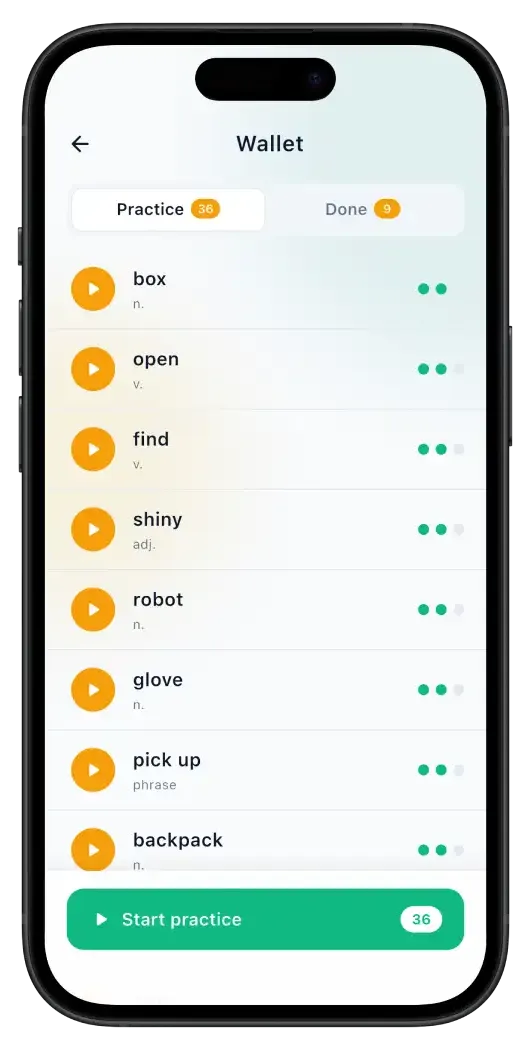
Erla's Vocabulary Wallet is where the words you meet stay.
The hardest part of building vocabulary isn't meeting new words — it's keeping them. You read a word in a story, understand it for a second, close the screen, and it's gone. The Vocabulary Wallet fixes that: it lets you save words while learning a language, straight from the lesson you met them in, with a single tap.
Every sentence you study in Erla — Listening, Reading, Watch, Chat, or Talk — now has a Words tab. It surfaces the three to five words worth keeping, each with a simple explanation in the language you're learning, two or three meanings in your own, and audio. Tap Add, and the word is yours.
Unlike a vocabulary builder app where you type lists by hand, your wallet fills itself from real content you actually understood. No importing, no set-up, no account — everything lives on your device and is ready the moment you want to practice.
How to save words while learning a language
Five steps, from meeting a word to keeping it for good.
- 1
Open the Words tab in any lesson
Tap any sentence in Listening, Reading, Watch, Chat, or Talk to open its explanation. Next to Translation and Explanation you'll find a new Words tab — it's in all five lesson types.
- 2
See the words worth keeping
Erla picks the three to five most useful content words from the sentence and shows each in its base form, with a grammar badge, a speak button, and a child-simple explanation in the language you're learning.
- 3
Reveal the meaning when you're ready
The native-language meanings stay hidden by default, so you first try to understand the word from the target-language explanation. Tap Show translation to check how close you got.
- 4
Tap Add to wallet
A quick animation plays, the add icon disappears, and the word is saved on your device. Tap a saved word again any time to reset it and send it back into rotation.
- 5
Find every saved word in the footer
A wallet button in the app footer keeps a running count of the words you're still learning. Open it to see two tabs: Practice for words in progress, and Done for the ones you've mastered.
Why saving words in context works
Three reasons a wallet beats a word list.
You keep words you actually met
A word you saved from a story you understood already has a hook in your memory — a scene, a sentence, a feeling. That context is why it sticks far better than the same word on a cold flashcard.
The explanation is in your target language
Each saved word carries a kid-level explanation in the language you're learning that never uses the word itself. You stretch to understand it the way you would abroad — not by skimming a one-word translation and moving on.
It fills itself, so you actually use it
Most vocabulary tools die because building the list is work. Erla's wallet grows on its own as you learn, so the only thing left is the part that matters: keeping the words and practicing them.
What people save to their wallet
Every mode is a source of new words worth keeping.
A word from a short story
Reading a fairy tale or a science snippet and one word keeps reappearing? Save it once and let it follow you into practice.
A phrase from a video
Catch a useful expression in a short clip. Open the Words tab, add it, and it's waiting for you later — no rewinding to find it again.
Something the AI tutor said
When your chat or voice tutor uses a word you only half-understood, save it from that exact message instead of hoping you remember it.
A word you keep mishearing
Some words refuse to stick by ear. Saving them with audio lets you replay the pronunciation until it finally clicks.
The useful little words
Connectors, common verbs, everyday nouns — the unglamorous words that make you sound fluent. Collect them as you meet them.
Words above your level
Met a word a little beyond where you are now? Save it; your wallet keeps it safe until you're ready to learn it properly.
What's inside every saved word
Small details that make a saved word worth keeping.
One-tap saving
Add a word from any lesson without leaving the sentence you're studying.
A target-language explanation
A simple, child-level definition that never contains the word itself — so you have to understand it.
Two or three real meanings
Native-language translations, hidden by default and revealed on tap, so you try before you check.
Word audio
A speak button on every word, so you learn how it sounds, not only how it looks on the page.
A live wallet counter
The footer shows how many words you still have in practice, visible at a glance.
On-device and free
Your wallet lives on your phone — no account, no sync to set up, and nothing to pay for.
It's a wallet, not a vault — and that's on purpose
Saving a word isn't the same as knowing it, and Erla won't pretend otherwise. A saved word starts as a reminder — something you understood once and want to meet again. The job of the wallet is to make that second, third, and fourth meeting actually happen, instead of leaving it to chance.
Two honest limits worth naming. Your wallet lives on one device for now — log in somewhere new and you start fresh. And saving alone won't move a word into your active vocabulary; that's what Word Practice is for. The wallet is where words wait; practice is where they're learned.
Vocabulary Wallet — FAQ
Short answers to what people ask before they start saving words.
Tap any sentence to open its explanation, then open the Words tab and tap Add to wallet on the word you want — it's saved to your device instantly. The Words tab appears in every lesson type: Listening, Reading, Watch, Chat, and Talk.
Where your words come from
The wallet fills itself from every way you practice in Erla.
Word Practice
Turn saved words into words you know — recognition, multiple choice, then spelling each one from memory.
Reading Mode
Short stories where new words appear in context — one of the richest sources of words to save.
Listening Mode
Catch words by ear at native pace, then save the ones you want to keep and study later.
Chat Mode
Save words straight from your AI tutor's messages as the conversation unfolds.
Start saving the words you meet
Pick your language and start filling your Vocabulary Wallet today. Erla is free on iOS and Android, in 22 languages — and every word you save is one you'll actually keep.